How to Expose a Virtual Machine
Categories:
3 minute read
By default, virtual machines are only accessible within the cluster. If you want to reach them outside the cluster, you have to expose the VM. Learn how to expose a virtual machine in a KubeOps cluster for external access by creating and applying a patch file with a matching label selector, and optionally verifying connectivity via ping.
Requirements
Make sure you have prepared the following points:
- A KubeOps cluster with at least one master node and root privileges.
- A running virtual machine in said cluster.
- The original configuration file (yaml) of said VM or at least its
label.
For example:
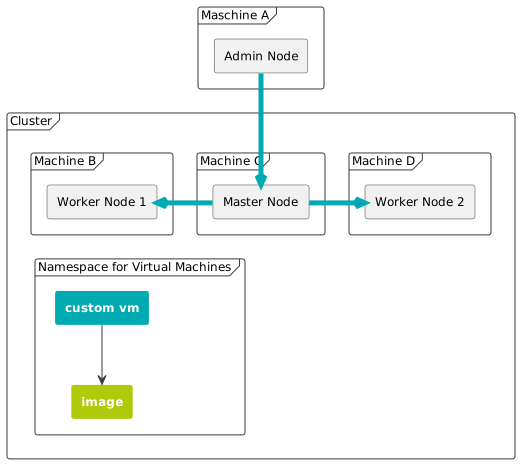
To follow this guide, use the following values. If you wish, you can adjust the values yourself. Make sure that the adjusted values are applied accordingly everywhere.
| Filename (VM configuration file) | custom-vm.yaml |
| Virtual Machine Label | kubevirt.io/vm: customvm |
| Virtual Machine Name | customvm |
| Virtual Machine Memory | 64M |
Step 1 - Create a Patch File
With the patch file we can patch multiple settings and behaviors of a virtual machine. A patch file uses the selector to search for a label with the same value. If no label with the same value exists, the patch will not be applied.
- Fetch the
labelfrom the desired virtual machine. use thekubectl describe vmcommand. Replace [VMNAME] with the name of the virtual machine that is to be exposed.
kubectl describe vm [VMNAME]
This will produce an output similar to the following.
    Name:         customvm
Namespace:    default
Labels:       kubevirt.io/vm=customvm
Annotations:  <none>
API Version:  kubevirt.io/v1
Kind:         VirtualMachine
Metadata:
  Cluster Name:
  Creation Timestamp:  2018-04-30T09:25:08Z
  Generation:          0
  Resource Version:    6418
  Self Link:           /apis/kubevirt.io/v1/namespaces/default/virtualmachines/customvm
  UID:                 60043358-4c58-11e8-8653-525500d15501
Spec:
  Running:  true
  Template:
    Metadata:
      Creation Timestamp:  <nil>
      Labels:
        Kubevirt . Io / Ovmi:  customvm
    Spec:
      Domain:
        Devices:
          Disks:
            Disk:
              Bus:        virtio
            Name:         containerdisk
            Volume Name:  containerdisk
            Disk:
              Bus:        virtio
            Name:         cloudinitdisk
            Volume Name:  cloudinitdisk
        Machine:
          Type:
        Resources:
          Requests:
            Memory:                      64M
      Termination Grace Period Seconds:  0
      Volumes:
        Name:  containerdisk
        Registry Disk:
          Image:  kubevirt/cirros-registry-disk-demo:latest
        Cloud Init No Cloud:
          User Data Base 64:  IyEvYmluL3NoCgplY2hvICdwcmludGVkIGZyb20gY2xvdWQtaW5pdCB1c2VyZGF0YScK
        Name:                 cloudinitdisk
Status:
  Created:  true
  Ready:    true
Events:
  Type    Reason            Age   From                              Message
  ----    ------            ----  ----                              -------
  Normal  SuccessfulCreate  15s   virtualmachine-controller  Created virtual machine: customvm
- Create a new file, for
patch-expose-customvm.yaml. And edit the file with your favorite editor.
nano patch-expose-customvm.yaml
Fill in the patch file with the following content. Make sure the following values are identical:
label(in original configuration file)selector(in this patch file)
In this example kubevirt.io/vm: customvm.
apiVersion: v1
kind: Service
metadata:
  name: customvm-service
  namespace: kubevirt
spec:
  type: NodePort
  selector:
    kubevirt.io/vm: customvm
  ports:
    - port: 22
      targetPort: 22
      # Optional field:
      nodePort: 30637
Save the file after editing.
Step 2 - Apply the Patch
- Use the
kubectl applycommand to apply the patch.
kubectl apply -f patch-expose-customvm.yaml
Optional: Step 3 - Ping the VM from outside the Cluster
- Login to the master machine.
- Identify the IP address of your exposed VM by using the
kubectl get vmicommand.
kubectl get vmi -A
This command lists all virtual machine instances. Since we only have one VM installed, the output looks something like this.
NAMESPACE   NAME         AGE   PHASE     IP              NODENAME       READY

kubevirt    example-vm   22h   Running   192.168.16.48   stackedadmin   True
- Login a machine that is outside the cluster (e.g. the admin node).
- Use the
pingcommand to check if the exposed virtual machine is accessible. Use the IP address from the previous step.
ping [IP-ADDRESS]
Next Steps
For more detailed explanation for virtual machine configuration files , see [Detailed Explanation for Configuration File for Custom VMs](Detailed Explanation for Configuration File for Custom VMs).