How to create and deploy a Custom Virtual Machine using KubeOps
Categories:
5 minute read
Creating custom virtual machines on top of Kubernetes is a powerful way to unify containerized and traditional workloads. In this introductory guide, you’ll learn how to set up your KubeOps cluster to deploy a Cirros-based VM using KubeVirt, from checking off a few key prerequisites to preparing and applying a concise YAML configuration file.
Whether you’re a seasoned Kubernetes user looking to expand your virtualization capabilities or just getting started with hybrid infrastructure, these steps will walk you through everything from generating the custom VM file to verifying its running status and accessing it over SSH. By following this process, you’ll have a seamlessly integrated virtual machine environment in no time - ready to support your application needs.
Requirements
Make sure you have prepared the following points:
- A KubeOps cluster with at least one master node and root privileges.
- A running kubeVirt instance. (see How to install KubeOps Virtualisation (KubeVirt)).
- Enough resources to support a virtual machine
For example:
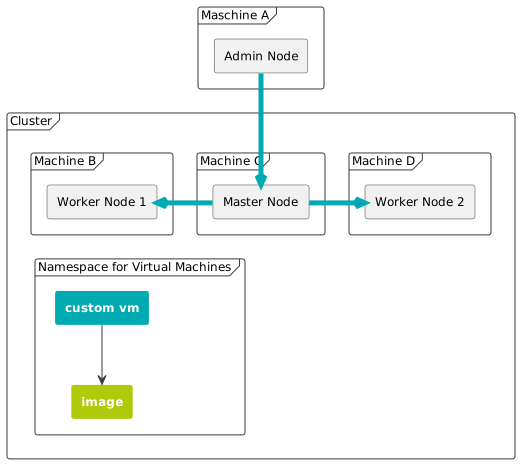
To follow this guide, use the following values to configure the custom virtual machine. If you wish, you can adjust the values yourself. Make sure that the adjusted values are applied accordingly everywhere.
| Filename (VM configuration file) | custom-vm.yaml |
| Virtual Machine Label | kubevirt.io/vm: customvm |
| Virtual Machine Name | customvm |
| Virtual Machine Namespace | kubevirt |
| Virtual Machine Memory | 64M |
Additional Information
For users to understand the most basic functionality of KubeVirt, one must know about the following fundemental concepts:
KubeVirt offers different methods to engage with the virtual machines through specialized custom resources (CR). On the lowest level is the VirtualMachineInstance (VMI) which represents the stateless instance of a virtual machine. These VMIs can be managed by higher level resources, such as VirtualMachine (VM), which realizes a stateful VMI that can be stopped and started while maintaining its data and state.
The manifests for these resources contain a multitude of parameters that surpass the needs of most users. Consequently this guide will not explain all parameters.
How to create and deploy a Custom Virtual Machine
The following steps will show you, how to manually create and access a virtual machine, using Kubernetes with a running KubeVirt instance.
Step 1 - Create a Configuration File for the Virtual Machine
To set up a virtual machine you need to create a configuration file. The configuration file contains information, such as name of the vm as well as its namespace, used resources (e.g. RAM) and states (e.g. running, halted). Use the file contents below and make desired changes.
Use the following content to create a basic vm configuration file custom-vm.yaml.
This file needs to be adapted at
spec.spec.volumes[0].containerDisk.image. You need to insert your local harbor deployments’ port.
apiVersion: kubevirt.io/v1
kind: VirtualMachine
metadata:
  labels:
    kubevirt.io/vm: example-vm-cirros
  name: example-vm
  namespace: kubevirt
spec:
  runStrategy: Always
  template:
    metadata:
      labels:
        kubevirt.io/vm: example-vm-cirros
    spec:
      domain:
        devices:
          disks:
          - disk:
              bus: virtio
            name: containerdisk
          - disk:
              bus: virtio
            name: cloudinitdisk
        machine:
          type: ""
        resources:
          requests:
            memory: 64M
      terminationGracePeriodSeconds: 0
      volumes:
      - name: containerdisk
        containerDisk:
          image: "127.0.0.1:5001/kubeops/kubevirt/cirros-container-disk-demo:v1.4.0"
          imagePullSecret: kubeops-vm
          imagePullPolicy: Always
      - cloudInitNoCloud:
          userDataBase64: IyEvYmluL3NoCgplY2hvICdwcmludGVkIGZyb20gY2xvdWQtaW5pdCB1c2VyZGF0YScK
        name: cloudinitdisk
The image, from which the virtual machine is created, can be found in the first section of spec.templates.spec.volumes of the manifest. It is used in the form of a ContainerDisk, meaning the image is part of a container image, within a remote repository.
This manifest will use a preconfigured image from the repository kubevirt/cirros-container-disk-demo:latest with the following credentials:
| User (cirros image) | cirros |
| Password (cirros image) | gocubsgo |
KubeVirt supports the ability to assign a startup script to a virtual machine. The script is executed automatically when the VM initializes. There are multiple datasources supported, which will inject those scripts through the use of ephemeral disks.
One of those datasources is called cloudInitNoCloud, which is mentioned here as the second volume in spec.templates.spec.volumes. VMs with the cloud-init package installed will detect the ephemeral disk and execute custom userdata scripts at boot.
Step 2 - Transfer the VM Image to your Local Registry
- Pull the image from the kubeops registry
podman pull registry.kubeops.net/kubeops/kubeops/kubevirt/cirros-container-disk-demo:v1.4.0-patch0
- Tag the image for the local registry
In the following command you need to insert your master1 ip address into the placeholder
podman tag registry.kubeops.net/kubeops/kubeops/kubevirt/cirros-container-disk-demo:v1.4.0-patch0 [your master1 ip]:5001/kubeops/kubevirt/cirros-container-disk-demo:v1.4.0-patch0
- Push the image to the local registry
In the following command you need to insert your master1 ip address into the placeholder
podman push [your master1 ip]:5001/kubeops/kubevirt/cirros-container-disk-demo:v1.4.0-patch0 --tls-verify=false
Step 3 - Deploy the Virtual Machine
Deploy the vm using the kubectl command and the custom-vm.yaml file.
kubectl apply -f custom-vm.yaml
Check the state of the vm.
kubectl get vmi -A
This command lists all virtual machine instances. Since we only have one VM installed, the output looks something like this.
NAMESPACE   NAME         AGE   PHASE     IP              NODENAME       READY
kubevirt    customvm   22h   Running   192.168.16.48   stackedadmin   True
Step 4 - Access the Custom VM
To connect to your newly created VM follow the documentation on how to access a Virtual Machine in a KubeOps Cluster
References
-
To know how to create a ContainerDisk from a local image, see Create a ContainerDisk from a local image guide
-
For more detailed explanation for virtual machine configuration files , see Detailed Explanation for Configuration File for Custom VMs.